Requirements: 7.0+
Overview: radio.net PRIME – radio and podcasts without video or banner adsa. The entire world of radio in one app – Listen to more than 30.000 local and international radio stations, internet radios and podcasts – whenever and wherever you want.
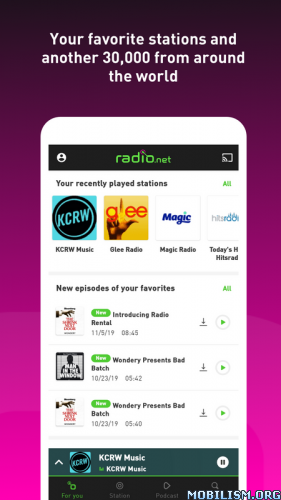
radio.net PRIME – radio and podcasts without video or banner ads.
The entire world of radio in one app – Listen to more than 30.000 local and international radio stations, internet radios and podcasts – whenever and wherever you want.
AT ONE GLANCE:
– Free of visual ads
– Over 30.000 stations
– Local stations from your region
– Editor’s Picks
– Categorical search: genre, topic, city, country
– Title information
– Save radios as favorites
– Similar stations
– Alarm clock
– Sleep timer
– Save songs you like
– NEW: Zapp feature for car and docking station
THE RADIO.NET APP IS…
WELL ORGANIZED
Find stations that fit your taste with the radio.net categories in the “Discover” section. Sort stations by genre, topic, city, country or top 100 and find out which songs are playing right now.
CLEAR
Under “My Radio” you got everything at one glance: Your recent stations and favorites, songs you liked, your personal recommendations and the alarm with your selected wake-up-time.
INDIVIDUAL
Save your favorite stations or songs that you like, and get personal recommendations fitting your taste in music. You can access your favorites via the website and in the app.
LOCAL
Find the best stations from your current location, wherever you are.
PUNCTUAL
With the radio.net alarm clock you can wake up with your favorite station every morning. All you have to do is select a station, set your wake-up time and make sure the alarm volume is set.
Tip: the app should be open while you are sleeping. If the app is closed or running in the background, you will be woken by an alarm signal and can switch to the station you selected with a single click.
And if you like, you can also go to sleep listening to your favorite station. Just set the sleeptimer and relax!
SIMPLE
Use the new zapp feature to control the radio.net app easily, even in the car or in a docking station. With a swipe you can zapp through the stations you recently heard and for Play and Pause you only need to touch the screen.
WORTH HEARING
With the Editor’s picks under “Discover” you will regularly find new radio stations you might like. Choose from classical stations like 181.fm – The Beat, Capital FM or triple j, online radio stations like .977 – The Hitz Channel and 1.FM – Top 40, genres like 80s, Rock, Jazz or Classic, or pick a topic like news, sports, culture or comedy.
.apks Bundle Info:
★ Untouched Paid apk with Original Hash Signature
★ Certificate MD5 digest: d2ae474bf0cfd9417a3c7f3a701415d0
★ No changes were applied
➡ Languages: en
➡ CPU architectures: arm64-v8a, armeabi-v7a
.apks Bundle Installation:
SAI Instructions: [no root]
1. Download and install latest SAI app (Split APK Installer) – https://github.com/Aefyr/SAI/releases
2. Download this .apks archive app;
3. Install and Open SAI / Choose “Install APKs” button / Find and Select downloaded .apks archive app;
4. Wait for install and done. Enjoy!
Lucky Patcher Instructions: [no root]
1. Download and install latest Lucky Patcher app;
2. Install and Open Lucky Patcher and choose ‘Rebuild & Install’;
3. Find and Select downloaded this .apks archive app;
4. Wait for install and done. Enjoy!
PS: Make sure after open SAI or Lucky Patcher you allowed STORAGE Permission and Install Unknown Apps Permission!
What’s New:
Hello Radio and Podcast Friends!
With the latest version of the app we have reached the next level in stability and performance.
All feedback helps us to improve the app constantly and to design according to your wishes.
Do you have feedback or questions? Just write an email to: support@radio.net and we’ll get back to you as soon as possible.
We are happy that you are using the radio.net app and if you like it, rate us in the Store.
This app has no advertisements
More Info:
https://play.google.com/store/apps/details?id=de.radio.android.prime&hl=enDownload Instructions:
.apks Bundle:
https://upfiles.com/T19joJv
Mirrors:
https://rapidgator.net/file/521af474468 … .apks.html
Standalone Android Package (No SAI needed):
https://upfiles.com/xv1tTTo
Mirrors:
https://rapidgator.net/file/303e4ffecc9 … 2.apk.html.