Requirements: 5.0+
Overview: MT Manager is a very powerful file manager and apk editor, you can use it to do a lot of things on your device, such as managing files, modifying and translating applications, editing text and so on.
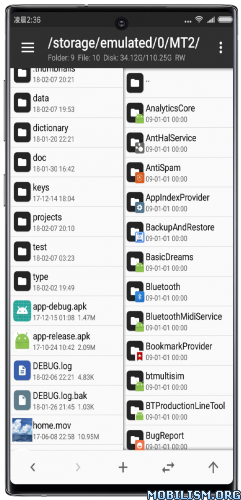
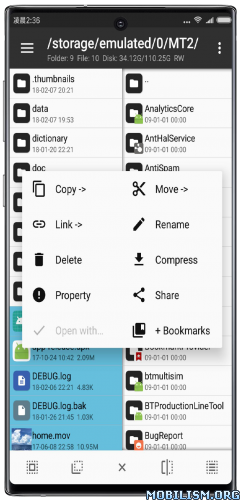
Features:
– FTP client
– Viewing the java code
– Support for keystore and jks signatures [VIP]
– Search History
– Search in XML files
– Search by ID in arsc
– Support for several dictionaries in the translator (UTF-8 without BOM) [VIP]
– Removing and adding localizations
– Fast transfer of unique strings to the desired localization
– Batch operations (delete, copy, move, rename)
– APK/ZIP Signing
– Cloning of APKs [VIP, free for the old method]
– Optimizing APK
– APK Encryption
– Creating a backup (.bak)
– Convenient color change in arsc
– Current Activities List
– Remote access via WiFi
– Decompilation / Compiling XML [VIP] (non-vip is limited to only 200-lines)
– Arsc Editor
– DEX Editor
– Fix DEX files [VIP]
– Text editor with syntax highlighting
– Comparison of text files up to 500 KB [VIP]
– View fonts (.ttf)
– Executing scripts
– Working with RAR (opening / unpacking)
– Work with ZIP (compression / unpacking)
– Multi-choice
– View / edit / delete / add classes, methods, domains, permanent
– Baidu Translator, Yandex and Google [VIP]
★ Untouched apk with Original Hash Signature
★ Certificate MD5 digest: 1a32f661095560285c0f7ea0b521cb45
★ No changes were applied
➡ Languages: Full Multi Languages
➡ CPU architectures: arm64-v8a, armeabi-v7a, x86, x86_64
➡ Screen DPIs: 120dpi, 160dpi, 240dpi, 320dpi, 480dpi, 640dpi
Note: The clone can be installed alongside the regular/normal version {Package Name: bin.mt.plus.canary}, useful in case you have multi-login activated, or need two separate instances of the app.
Version – TargetSdk28
Due to policy requirements of app store, MT’s targetSdk has been upgraded to 30.
This change will have several impacts:
– Execution permission has been removed from application data directory. This change mainly affects terminal emulator: previously you could put executable file in home directory and then chmod +x to execute it, but now you cannot do this.
– For ROOT devices, if -su command does not support setting mount namespace, then only two folders can be seen after accessing the /data/data directory. This situation is currently known to exist in Meizu’s own ROOT.
– If these changes affect your use, you can download TargetSdk28 version, and above problems will not exist.
– This version can only be downloaded from official website and will not be put on app store. Subsequent updates can be updated from within app or downloaded from official website. Do not update from app store!
What’s New:
Version: 2.26.4 ✅️ (26040391)
– [Added] Arsc++ now performs a pre-compilation check for missing entry definitions in type-info and supports one-click addition.
– [New] main interface sidebar now supports creating independent network storage groups.
– [New] text comparer now includes a toggle menu for whether to automatically synchronize scrolling.
– [New] Support for editing class files in Jasm format (previous Smali format editing had compatibility issues and has been removed).
– [Optimized] installation package extraction function now silently checks for changes in application list when returning to foreground from background.
– [Optimized] Improved stability and startup speed when obtaining Shizuku authorization.
– [Fixed] problem with convert apks to apk using attr from android 17
– [Fixed] issue where folder comparison function would get stuck on pipes and other file types.
– [Fixed] issue where bookmark function would mistakenly delete unselected duplicates during batch deletion.
– [Fixed] issue where compressed files could not be updated on Android emulators on Windows systems.
– [Fixed] issue where a STATUS_SHARING_VIOLATION error would occur when opening files using SMB function if file write handle was already in use.
– [Fixed] issue where script executor would not end session after being interrupted by Ctrl+C.
This app has no advertisements
More Info:
https://mt2.cn
https://t.me/mtmanager
Download Instructions:
https://upfiles.com/cVdZq
Mirrors:
https://rapidgator.net/file/fdb2e571ba960c650cb787de3f849982/MT2.26.4.apk.html
https://frdl.my/dfr4wgstynki/MT2.26.4.apk
Clone:
https://upfiles.com/Apdl3nAK
Mirrors:
https://rapidgator.net/file/ed05bb588b7 … e.apk.html
https://frdl.my/ryzaxsggwect/MT2.26.4-clone.apk
TargetSDKversion=28:
https://upfiles.com/PA4Ph
Mirrors:
https://rapidgator.net/file/c2e404cdd01 … 8.apk.html
https://frdl.my/tm59v2czxfax/MT2.26.4-target28.apk
Clone:
https://upfiles.com/2NVCAMh4
Mirrors:
https://rapidgator.net/file/63898e0074c … 8.apk.html
https://frdl.my/a2n3ui3518od/MT2.26.4-clone-target28.apk.